

Modern technology sometimes encounters unexpected problems, and smartphones, while incredibly powerful, are not immune to malfunctions. Among these annoyances, an unresponsive touchscreen can be particularly frustrating. In such a case, knowing how to shut down your device is essential. If you own an iPhone 11, this article will provide practical solutions and detailed steps to turn off your device without using the touchscreen. Whether you’re experiencing a serious screen issue or simply want to force-shut down the device, several methods are available. Let’s explore these techniques together.
Understanding the importance of being able to turn off your iPhone 11
Knowing how to turn off your iPhone 11, even without using the touchscreen, isn’t just a matter of convenience, but also a necessity in case of technical problems. Indeed, an unresponsive smartphone can cause various inconveniences. Imagine a situation where you’re on the go, and your iPhone suddenly freezes. What should you do in such a case? The first thing to keep in mind is the importance of resetting and shutting down the device to resolve technical issues.
Reasons why you might need to turn off your device include:
- Non-functional touchscreen: Sometimes the screen becomes completely inactive, making it impossible to turn off via the usual method.
- Total device failure: When the iPhone no longer responds to any function, a physical method of shutdown becomes crucial.
- Increase battery life: Turning off your device can also be a good energy-saving practice, especially if you don’t have access to a charger for a while.
Turning off your device when it freezes can restore normal operation and prevent further potential problems. It can also help prevent unexpected device behavior, such as endless restarts or frozen apps.
Using the hardware buttons to turn off the iPhone 11
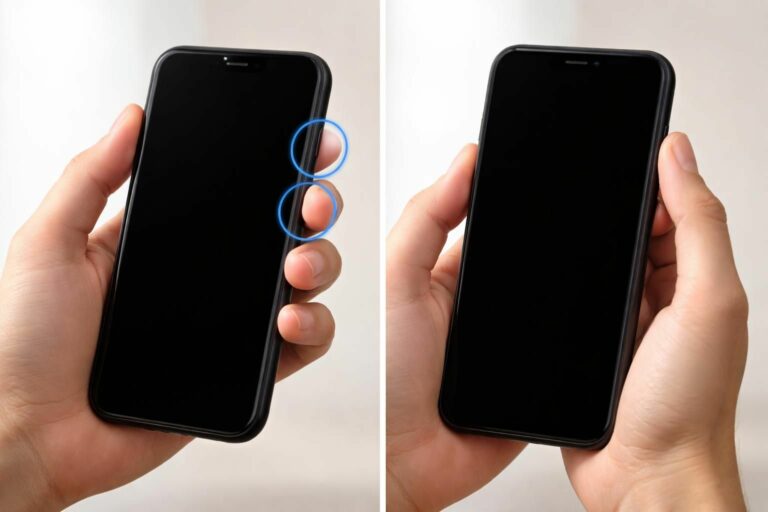
The simplest and most direct way to turn off your iPhone 11 without using the touchscreen is to use its physical buttons. Here are the detailed steps to do so:
1. Press and hold the side button: This may seem obvious, but it’s the crucial first step. Holding this button down activates the shutdown interface.
2. Also, press one of the volume buttons: Whether you choose the volume up or volume down button, holding one of them down at the same time as the side button is essential. This will display a cursor on the screen.
3. Slide the Power Off slider: Normally, you would do this with your finger, but in this case, we will discuss another solution to force the device to shut down.
4. Wait: Once you have swiped to turn off, it is important to wait approximately 30 seconds for the device to complete the process.
In the event of a screen that remains frozen, the combination of these buttons allows you to bypass the restrictions of an unresponsive touchscreen.
Force restart your iPhone 11
If your iPhone 11 is still unresponsive after trying to turn it off using the previous methods, there is an option to force restart your device. This method acts like an instant “reset,” and here’s how to do it:
1. Press the volume up button: A quick press followed by a release is required. This signals the device to respond.
2. Press the volume down button: Similarly, a quick press and release are required here as well.
3. Press and hold the side button: After completing the first two steps, press and hold the side button until the Apple logo appears on the screen.
Note that this operation usually takes about 10 seconds. However, even if the touchscreen is not working, this restart can free the device from a frozen state.
It is worth noting that this method will not completely shut down your iPhone 11, but it may resolve some temporary issues.
Troubleshooting: Why isn’t the touchscreen working?
Addressing the issue of an unresponsive touchscreen requires careful attention. Understanding why your screen isn’t responding can help you not only turn off your iPhone 11 but also prevent this from happening again. Here are a few things to check:
Clean the screen: A screen soiled by residue or liquids can cause responsiveness problems. Use a microfiber cloth to wipe it gently.
Make sure no accessories are blocking the screen: Sometimes, connected accessories, such as Lightning or USB-C cables, can interfere with operation. Unplug them to see if that resolves the issue.
Users report that 40% of touchscreen problems stem from contact with external elements that alter the device’s sensitivity. Finally, remember to check for software updates. An outdated iPhone can also cause slowdowns.
| Issue | Solution |
| Dirty screen | Clean with a microfiber cloth |
| Trendy accessories | Disconnect all cables |
| Software problem | Update the device |
Alternative solutions to turn off your iPhone 11
In some situations, you may be unable to force your iPhone 11 to shut down using the methods mentioned above. Completely draining the battery can also be considered. However, this should be a last resort.
Let the device discharge: This simply means leaving your iPhone 11 running until the battery is completely drained. This process can take several hours, but it will ensure your device shuts down automatically.
However, this method is not recommended for regular use, as a complete discharge can damage your battery over time. To avoid this, opt for a quick recharge after draining the device to maximize your battery’s lifespan.
On the other hand, another often overlooked aspect is monitoring your iPhone 11 for any anomalies; this could prove crucial in identifying problems before they reach a critical stage.
The impacts of an inappropriate extinction
Turning off a smartphone isn’t something to take lightly. This simple action can have consequences if done incorrectly. Frequently turning off your iPhone 11 can have negative effects. It can lead to unusual behavior from the device, or even a reduction in battery life over time.
Indeed, as with any electronic device, an uncontrolled shutdown can cause excessive operating stress and impair overall performance. Numerous studies indicate that users complain of damage resulting from frequent forced shutdowns.
On the other hand, properly shutting down your device and taking good care of it will prolong its lifespan. Keeping a close eye on your battery status and software performance will also help maintain its longevity .
Preventing touchscreen problems in the future
It’s crucial to take preventative measures to avoid problems with your iPhone 11, especially with the touchscreen. Regular maintenance is key. Here are a few tips:
Keep your iPhone up to date : Updates often include security patches and performance improvements. Make sure your iPhone is always performing at its best.
Protect your device with a suitable case : Using a case can offer essential protection against bumps and drops, preventing potential damage to the touchscreen.
Avoid overusing resource-intensive apps : Some apps can cause your device to overheat, impacting performance. Limit their use and close any apps you’re not using.
Preventing problems may seem like a secondary task, but investing time in the maintenance of your iPhone 11 will pay off in the long run.


Sonu
Tuvdru
It’s a ii
Yes sure u
Tu jhtrru
Juyy
AmIT saexna
Hm8thtn
Sumit 125590
whoah this blog is magnificent i love reading your articles. Keep up the great work! You know, lots of people are looking around for this info, you can aid them greatly.
Hmm is anyone else having problems with the images on this blog loading?
I’m trying to figure out if its a problem on my end or if it’s the blog.
Any suggestions would be greatly appreciated.